


Zaxbys
3.04.30K Reviews
App Specs
- Version
- 13.1.2
- Updated On
- License
- Free
- Downloads
- 1,000,000+
- Developer
- Zaxby's Franchising, LLC
- Categories
- Food & Drink
- Platform
- Android, iOS
Screenshots

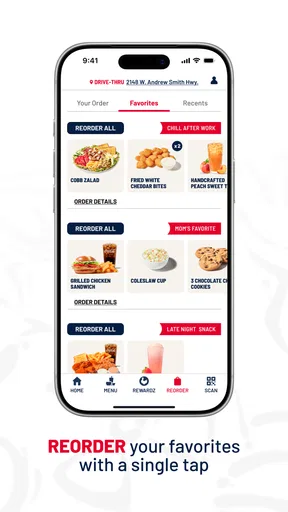
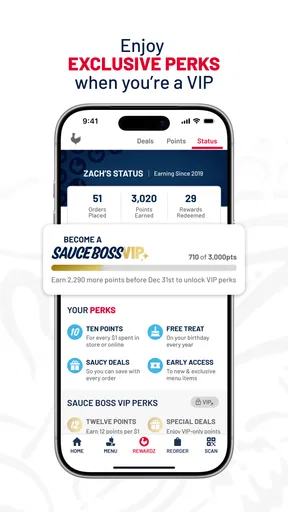
 Analysis by AppCompare
I find the Zaxbys app most useful when I already know I want a meal from Zaxby’s and would rather plan the order on my phone than make decisions at the counter. It brings ordering and rewards together in one place, which suits regular customers better than someone looking for a general restaurant-discovery tool. My overall view is positive but measured: the convenience is real, while the app’s value depends on having a participating location nearby and wanting what the chain serves.
A focused tool for a familiar craving
This is a Food & Drink app from Zaxby's Franchising, LLC, built around ordering, earning rewards and redeeming them. It is free, carries an Everyone age rating, and has been available since December 15, 2016. The current version is 12.12.1, and it requires Android 7.0 or later on Android devices. Those details make it easy to judge whether it fits your phone and whether you’re comfortable installing a restaurant’s own app rather than relying on a broad delivery service.
The app has a 3.0 average from around 7,400 ratings, alongside roughly 4,200 written reviews, and has passed 1 million installs. I wouldn’t treat those figures as a verdict on every order or every location, but they do suggest a mixed experience rather than a universally smooth one. I’d try it for a specific practical reason—placing an order or managing rewards—not because I expect the app itself to transform a meal.
Where it earns its place
The strongest case for installing it is repeat use. If Zaxby’s is already part of your routine, having ordering and rewards in one dedicated app can save time and make it easier to keep track of the chain’s offers. I’d check the menu and available options before leaving home, especially when I’m choosing for more than one person; that gives me a chance to settle the order without holding up a queue or trying to remember everyone’s preferences under pressure.
That convenience has a clear boundary: this is not a general food-ordering marketplace. It makes sense when you’ve chosen Zaxby’s, while a delivery app or a restaurant’s website may be more useful if you’re comparing several places, coordinating different cuisines, or need a wider selection of delivery choices. I’d also confirm that a nearby location serves the ordering option I want before building a plan around the app.
Rewards need a little attention
Rewards can make the app more worthwhile for someone who visits regularly, but I’d approach them as a bonus rather than a reason to buy food I didn’t want. Before placing an order, I’d look over the available offer and redemption details, then decide whether they fit what I was already planning to get. That small check helps avoid treating a promotion as a saving when it actually nudges me into spending more.
The app is also best judged by the whole ordering routine, not just the number of taps. A saved or familiar order can be convenient when the group wants the same thing as last time, but it is less helpful if everyone is changing choices or if the occasion calls for careful comparison. For a first visit, I’d browse the menu at a relaxed moment, make a short list, and use the app once I know what I want. That is a more reliable way to benefit from mobile ordering than starting from scratch while hungry and rushed.
Worth Reading Before You Choose

EA SPORTS FC Mobile 26 Is a Bigger Football Game, but It Takes Time

Flipboard Shows What News Apps Must Do Beyond the Feed

Switching to Android Auto Means Rethinking Your Driving Routine

Google Calendar Makes a Crowded Week Easier to Manage

Ludo King Makes the Most of the Minutes Between Plans

Baby Panda World Brings Quick Play to Modern Phones, but Its Game Library Feels Busy
Who should choose it—and who can pass
I’d recommend giving it a try if you regularly eat at Zaxby’s, want to place orders ahead, or like having the chain’s rewards in the same place as your ordering. It is also a reasonable option for someone who wants to inspect the menu before deciding what to pick up. If you only visit occasionally, prefer choosing among many restaurants, or don’t want another account and restaurant app to manage, the extra setup may not repay the effort. In that case, ordering directly at the restaurant can be simpler.
Ever found yourself craving some delicious chicken, but not sure where to turn? Well, let me introduce you to the Zaxby’s app, your new best friend for all things crispy and tasty. I took it for a spin, and here's the lowdown.
Getting Started with Zaxby’s App
First things first, downloading the app is a breeze. Whether you’re on Android or iOS, just hit up your app store, and you’re good to go. Once installed, you’ll find a clean, user-friendly interface that makes browsing the menu a joy. No more fumbling around when you’re hangry!
Exploring the Menu
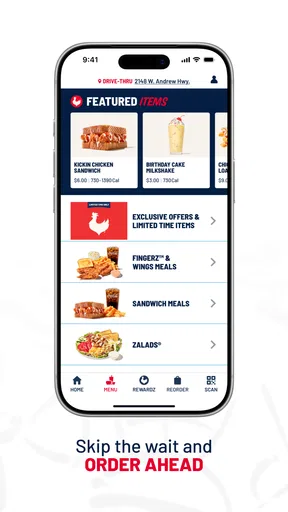
The Zaxby’s app opens up a world of chicken goodness right at your fingertips. You can easily explore the menu, which is packed with everything from their iconic Chicken Fingerz to mouth-watering Zalads (yes, salads that actually taste good). The app lets you customize your order with just a few taps, so picky eaters rejoice!
One of my favorite features is the ability to save your go-to orders. So, the next time you’re in the mood for that Chicken Finger Plate with extra Zax Sauce, it’s just a tap away. Talk about convenience!
Ordering Made Easy
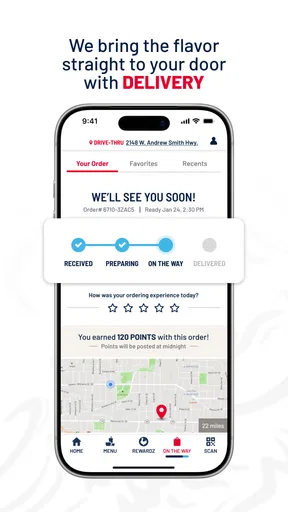
Ordering through the app is a smooth experience. You can choose between pickup and delivery, depending on how lazy you’re feeling. The app's location services quickly find the nearest Zaxby’s, and you can track your order in real-time. So, no more guessing when your meal will arrive.
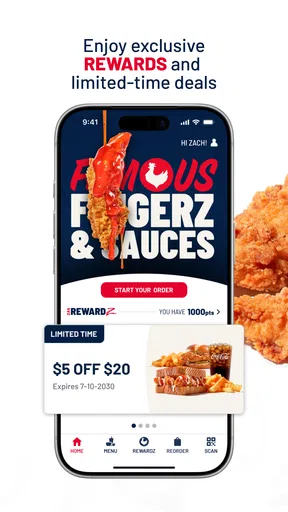
For those who love deals (and who doesn’t?), Zaxby’s app doesn’t disappoint. The app regularly updates with exclusive offers and promotions. Just make sure notifications are on, so you don’t miss out on that freebie or discount.
Rewards and More
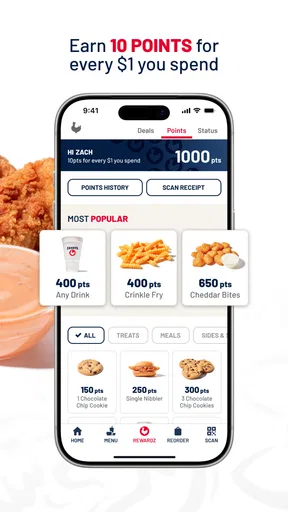
If you’re a loyal Zaxby’s fan, the app's rewards program is a must. Every purchase earns you points, and these can be redeemed for some seriously tasty rewards. Free food always tastes better, right?
The app also has a nifty feature that lets you send gift cards. Perfect for those last-minute gifts or if you just want to treat a friend to some chicken love.
What I’d check before placing the order
For a realistic weeknight use, I’d open the app before the drive home, settle the group’s choices, and then choose a location that fits the route. That reduces the awkward last-minute decision at the counter, but it doesn’t mean every branch or order type will suit every plan. If timing matters, I’d leave room for pickup and avoid assuming a displayed estimate is a guarantee; traffic, a busy kitchen, and the distance from the selected restaurant can all affect when food is ready.
One useful habit is to treat customization as a final confirmation step, not a place to rush. I’d read the order back before submitting, particularly when changing sauces or sides for several people. It’s an easy way to catch a small mistake while there’s still time to correct it, and it matters more than shaving a few seconds off checkout. For a first order, I’d keep the choices simple and learn how the location handles the process before relying on a more complicated group order.
Convenience has trade-offs
Compared with calling a restaurant, using the app can make choices easier to review and gives me a way to place an order without explaining it aloud. Compared with a broad delivery service, its appeal is narrower: I’m using it for one chain, not weighing menus across town. That focus is a strength when I know what I want, but a drawback when I’m still deciding where to eat. A delivery marketplace may be a better fit for comparing restaurants; direct ordering is the more natural choice when Zaxby’s is already the plan.
I’d also keep an eye on the practical details around rewards. The benefit is most straightforward when I’m already making a purchase and can see an offer that genuinely matches it. I wouldn’t add an extra item just to chase a reward, and I’d check the terms shown in the app before counting on a particular redemption. Offers can change, so a deal I saw on an earlier visit should not be treated as a permanent feature of the next order.
Everyday use, not a must-have for everyone
Imagine picking up dinner after work for yourself and a family member who wants something different. I’d browse the menu while I have a quiet moment, ask what each person wants, and place the order once the location and pickup plan are clear. The saved-order option can help on a later visit if our usual choices remain the same, while the ability to customize is more useful when someone wants a small adjustment. This is where the app earns its place: it organizes a familiar purchase, rather than making the restaurant itself a better fit for every appetite.
For a first-time customer, I’d use the menu to get oriented, but I wouldn’t assume every item or customization is available at every location. If a choice is important—especially for a group—I’d verify what appears for the selected restaurant before promising it to anyone. People with dietary requirements should likewise inspect the item information carefully and ask the restaurant when they need a definitive answer; a convenient interface is not a substitute for confirming food details that matter to them.
There are also good reasons to skip the app. If you rarely visit, dislike installing single-brand apps, or prefer to make decisions in person, ordering directly may be less hassle. If delivery choice and comparison are your priorities, a wider service may better match the job. And if your nearest restaurant is not convenient for the way you want to order, the app cannot solve that basic location problem. I see it as a practical companion to a regular Zaxby’s habit, not something every chicken fan needs on their phone.
Final Thoughts
Overall, the Zaxby’s app is a game-changer for chicken lovers. It’s intuitive, packed with features, and makes the whole ordering process a breeze. Whether you’re a regular or a newbie, this app enhances your Zaxby’s experience. So, next time you’re craving something fried and fabulous, give the app a whirl. Your taste buds will thank you!
My recommendation is more specific: install it if ordering ahead or keeping up with rewards will genuinely simplify visits you already make. I like the idea of having the menu and order routine close at hand, but I’d still compare the available choices with what I need that day and avoid relying on a deal until I’ve checked its terms. The app is free to try, and its purpose is clear; its value comes down to location, habit, and whether mobile ordering feels easier than your usual approach.
Pros
- User-friendly interface and easy navigation.
- Extensive menu with detailed item descriptions.
- Convenient online ordering and payment options.
- Loyalty program with rewards and discounts.
- Real-time order tracking for accurate updates.
Cons
- Limited customization options for orders.
- Occasional app crashes during peak times.
- Requires stable internet for full functionality.
- Some features unavailable in certain regions.
- Notifications can be overly frequent.
FAQs for Zaxbys
What is the Zaxby’s app used for?
The Zaxby’s app is designed to enhance your dining experience by offering features such as online ordering, customizing your meals, and accessing exclusive promotions. With the app, you can easily browse the menu, find nearby locations, and manage your Zax Club rewards all in one convenient place.
How does the Zax Club rewards program work within the app?
The Zax Club rewards program allows you to earn points for every purchase made through the app. These points can be redeemed for free food and other rewards. You can track your points, view available rewards, and receive special offers directly through the app, making it easy to enjoy benefits every time you dine.
Can I customize my order through the Zaxby’s app?
Yes, the Zaxby’s app allows you to fully customize your order. You can choose from a variety of options to modify your meal according to your preferences, including selecting specific ingredients, adjusting portion sizes, and specifying preparation methods. This feature ensures that your meal is prepared exactly how you like it.
Are there any exclusive deals available on the Zaxby’s app?
The Zaxby’s app frequently provides exclusive deals and promotions that are not available elsewhere. Users can access discounts, special menu items, and limited-time offers directly through the app. Notifications can be enabled to stay updated on the latest deals, ensuring you never miss a chance to save.
Is the Zaxby’s app easy to use for first-time users?
The Zaxby’s app is designed with user-friendliness in mind, featuring an intuitive interface that guides first-time users through the ordering and rewards process. Comprehensive help sections and customer support options are available to assist if you encounter any issues, ensuring a smooth and enjoyable experience from start to finish.


